Unauthenticated admin password leak in ZTE ZXHN H267A
Contents · 13
CVE: TBD
ISP: O2 (Czech Republic)
Vendor: ZTE
Model: ZTE ZXHN H267A
Firmware version: V1.0.5_CZ.2T19
Status: EOL device, ISP confirmed the vulnerability
Introduction
My first vulnerability, which I found and published, pushed me to look at the devices I use a lot more skeptically and to actively hunt for security bugs in them. And it paid off. I went after another router running at my place, and this time I stumbled on a bug significantly more severe than the conditional AFR (Arbitrary File Read) from back then.
Specifically, it's the ZTE ZXHN H267A - a router provided to customers by the ISP, in my case O2 (firmware V1.0.5_CZ.2T19). And a spoiler right off the bat: you can pull the admin password out of it without logging in at all.
Discovery
First I wanted to see what the router actually does, so I opened the network tab in the browser and watched the requests going out before login.
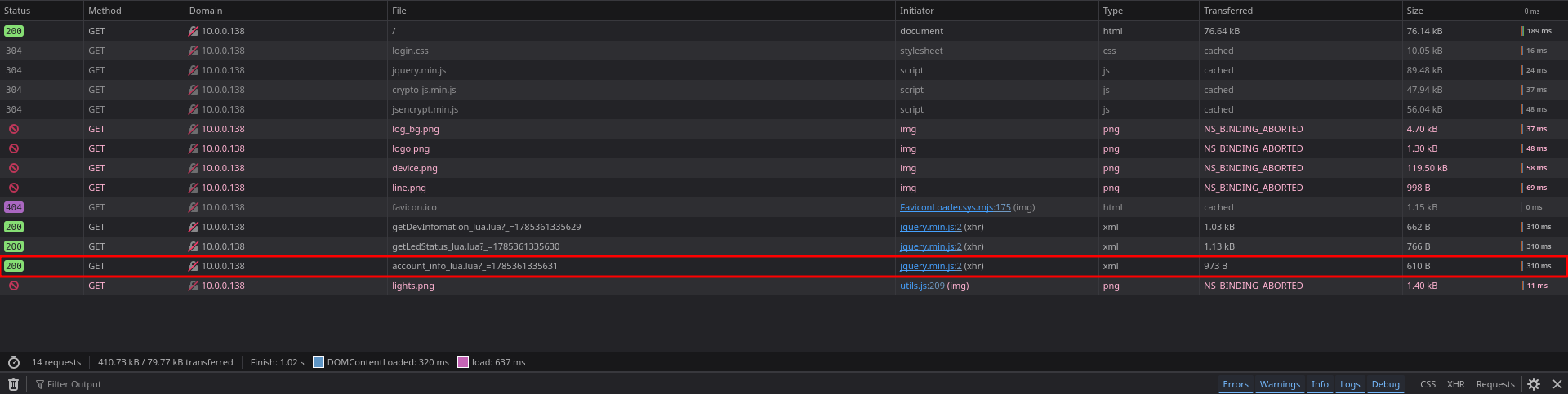
Right away I noticed a request to the endpoint /common_page/account_info_lua.lua with the following response:
<ajax_response_xml_root>
  <IF_ERRORPARAM>SUCC</IF_ERRORPARAM>
  <IF_ERRORTYPE>SUCC</IF_ERRORTYPE>
  <IF_ERRORSTR>SUCC</IF_ERRORSTR>
  <IF_ERRORID>0</IF_ERRORID>
  <OBJ_USERINFO_ID>
    <Instance>
      <ParaName>_InstID</ParaName>
      <ParaValue>IGD.AU1</ParaValue>
      <ParaName>Password</ParaName>
      <ParaValue>cmFuZG9tIHN0dWZmCg==</ParaValue>
      <ParaName>Username</ParaName>
      <ParaValue>admin</ParaValue>
    </Instance>
  </OBJ_USERINFO_ID>
  <encode>Password</encode>
  <OBJ_CZLOGIN_ID>
    <Instance>
      <ParaName>_InstID</ParaName>
      <ParaValue>IGD</ParaValue>
      <ParaName>RememberPwd</ParaName>
      <ParaValue>0</ParaValue>
    </Instance>
  </OBJ_CZLOGIN_ID>
</ajax_response_xml_root>
At that point I was mildly shocked - I was staring at the admin username (admin) and its password, which at first glance looked like base64. The <encode>Password</encode> at the end pretty much confirmed it - the server is essentially telling you which field is encoded. So I tried to test my hypothesis with base64 -d, but all I got was unreadable characters. The password is most likely encrypted, with base64 serving only as the transport format.
Important detail: The endpoint itself doesn't require any authentication. We do need a cookie for session consistency though, because the server encrypts the blob with a token derived from the current session SID (small spoiler: that token is exactly the value we'll find sitting openly in the HTML of the login page as the key). If we send both requests (loading the login page and calling the endpoint) with the same cookie, we get the token and the blob from the same session, and decryption works correctly. Without a cookie or with different sessions, the token and the blob's key wouldn't match, and decryption would fail.
So the server happily hands out the (encrypted) admin password to anyone who knows how to ask. That alone is a leak of the username and encrypted password without authentication, which would more than suffice for a report on its own. But I wanted to see how far the impact of this bug could go.
This router has one interesting trait: the cryptography for the "Remember me" feature runs entirely on the client side. That means the server has to hand the client everything needed to decrypt the obtained password, including the key. And it was exactly while looking for that logic that I found a function in the client-side JavaScript.
How the password is "protected"
This function handles the encryption:
function encodePara(data, key, iv) {
    var key = CryptoJS.SHA256(key);
    var iv = CryptoJS.SHA256(iv);

    var encrypted = CryptoJS.AES.encrypt(data, key, {
        iv: iv,
        mode: CryptoJS.mode.CBC,
        padding: CryptoJS.pad.ZeroPadding
    });

    return encrypted.toString();
}
No magic here, plain AES in CBC mode with ZeroPadding. The input key and iv are run through SHA-256 first, and the result serves as the actual key and initialization vector. The interesting part is that the same way the page encrypts the data, it also decrypts it. In other words: once I have the key, I can just reverse the whole process.
And that brings us to the core of the problem - where is the key?
The key sitting right in the HTML
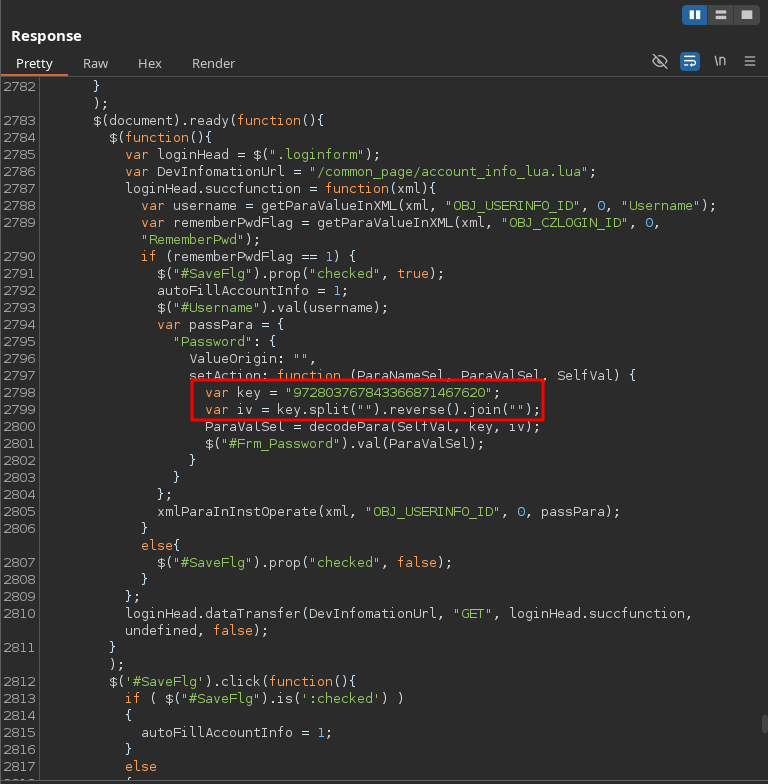
The answer is somewhat tragicomic. The key is in the inline JavaScript of the login page, which the server serves up without any authentication whatsoever:
var key = "307479559105475063077590";
var iv = key.split("").reverse().join("");
So:
- the key is a string right in the page's source code,
- the IV is derived from it in the simplest possible way - by reversing the character order.
This value is the only "secret" input of the entire mechanism that's supposed to protect the stored password. Except it's not secret at all - anyone who views the source of the login page gets it. So from a protection standpoint it's more decoration than actual security.
To be fair, the key does at least rotate regularly, roughly once a minute. I actually found out by accident when the "encrypted" password value changed on me. At first it looked like a bug, but in reality I just happened to catch the moment when the key rolled over. It doesn't change the outcome though - at any given moment the valid key is publicly available on the page, so all an attacker has to do is read the current one.
Decryption
Now I had both pieces of the puzzle in hand:
- the encrypted password from
account_info_lua.lua(no authentication), - the key from the login page source code (IV derived by reversing it).
The rest is just flipping the encodePara function - take the key, hash it with SHA-256, derive the IV by reversing the key and hash that too, and run the base64 password through AES-CBC decryption with ZeroPadding. Decryption is perfectly doable right in the browser's developer console, but to make testing more comfortable I wrote a small PoC script that automatically pulls the token (whose value is identical to the key) from the device, downloads the encrypted password, and returns it in readable form. Based on a recommendation from NÚKIB, I did not publish the script, but the result was clear:
------ RESULT ------
User: admin
Password: [...REDACTED...]
The admin password in plaintext. Without logging in. Purely from things the server hands out voluntarily.
Root Cause Analysis
The main reason this bug exists at all is that all the cryptography for the "Remember me" feature is delegated to the client. That creates a security dilemma: the client either needs to know the password in plaintext, or needs to be able to derive it somehow, as we just saw here. It's not really a bug in the code - the whole feature is insecure by design.
Impact
Let's sum up what the bug means in practice. The attacker needs just one thing - to reach the router's web interface. No credentials, no brute-force, nothing. Once they get to the interface, they gain full administrator access, and with it for example the ability to:
- change the configuration and disable security features,
- redirect DNS and intercept or spoof traffic (man-in-the-middle, phishing),
- pull or change the Wi-Fi password (by default the admin account has the same password as the Wi-Fi),
- use the router as an entry point into the local network and attack other devices,
- establish persistent access on the device.
The resulting severity then heavily depends on whether the admin interface is accessible only from the local network or also from the internet (WAN).
Over 2,000 devices exposed to the internet
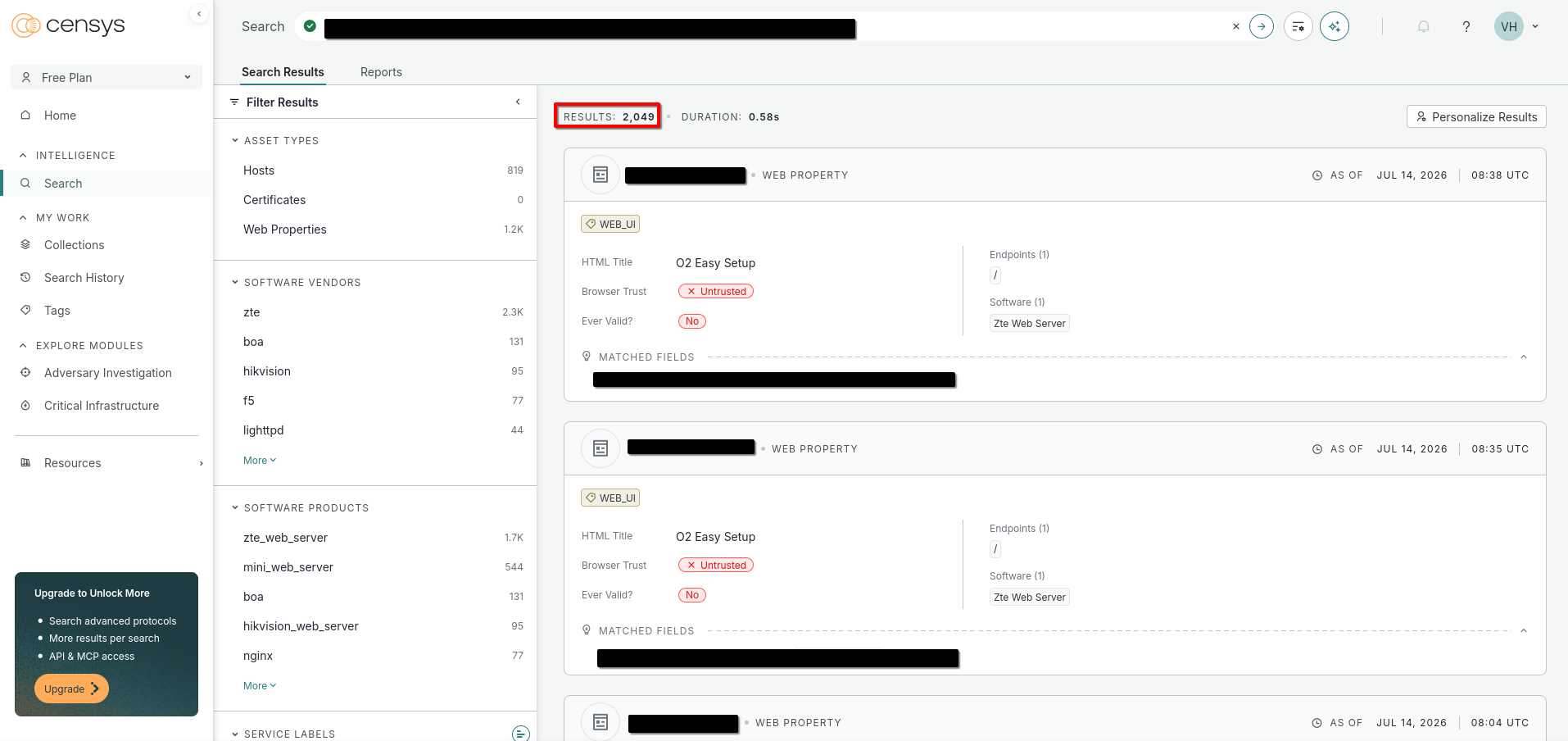
And this is where it starts getting uncomfortable. Through Censys I checked how many of these routers have their interface exposed directly to the internet, and I counted over 2,000 confirmed vulnerable devices. The real number may be higher if the same bug shows up in other ZTE router models that ISPs deploy. The bug takes on real-world proportions with this and stops being a theoretical lab problem: it threatens actual users, and on top of that the attack works from the other side of the world, completely without detection - because the requests to obtain the "encrypted" password and the necessary key are indistinguishable from simply viewing the router's login page.
ISP statement
O2 responded to the situation as follows (translated from Czech; the original version is in the Czech article):
Hello Mr. Hron,
Thank you for the detailed notification and for submitting the report regarding the security vulnerability in the ZTE ZXHN H267A router.
We forwarded your report for internal operational and security analysis. The vulnerability was then tested in detail by our internal Red Team, who confirmed both its existence and the possibility of its exploitation.
We also verified the conditions under which the vulnerability can actually be exploited. Successful exploitation requires at least one of the security settings, which are configured in the device's default setup to prevent the attack, to be changed. Specifically:
enabling the router's administration interface for internet access, which is disabled by default, or
using Wi-Fi without appropriate security (WPA2 is enabled by default).
If the customer has not made either of these changes, it is not possible, according to our verification, to exploit the described vulnerability in this manner.
At the same time, we have conducted a review of devices of this type in our customer network. We have identified customers whose router's administration interface is exposed to the internet. We will contact these customers directly to alert them to the need to change this setting, or we will recommend a device replacement.
The ZTE ZXHN H267A router is an outdated model that O2 no longer offers and for which no new firmware versions are available. We also inform customers of this fact on our website, where we recommend replacing the device with a newer type.
Thank you once again for the responsible disclosure and for providing a detailed technical report. We appreciate your notification, and it helped us carry out a targeted review of devices in our network and take appropriate measures.
Best regards,
O2.
After that came one more automated goodwill message (also translated from Czech):
We are sorry that the Fixed Internet service ([REDACTED]) did not work as it should have recently. We apologize. To make up for it at least a little, you will find a discount of ~$9 (200 CZK in the original) on your next bill. We calculated the amount based on the duration of the outage in days relative to the service price, and you will find it under the item "One-time discount for non-functional services."
Your O2
Which if nothing else, counts as a "bug bounty" :).
Responsible disclosure experience
This was my first experience with responsible disclosure (not counting D-Link, who didn't even reply), and I have to say it wasn't exactly a positive one. O2 didn't communicate with me at all - I always had to be the one calling or writing - and they didn't give me any useful information about the bug or a planned fix. I deliberately didn't set a deadline, so as not to put unnecessary pressure on the developers, because I know that in these situations bureaucracy slows the whole process down considerably. But even so, I expected that after nearly 3 months they'd at least have a planned fix date. Or at least a quick patch that would temporarily remove the "Remember me" feature but prevent the bug from being exploited. That's why I escalated to NUKIB (the Czech National Cyber and Information Security Agency), who fortunately were able to step in on my behalf and push the ISP harder to actually do something about it. I have to thank NUKIB here for handling the situation.
Recommendations
If you have this router at home:
- Check that the admin interface isn't accessible from the internet (WAN), and if it is, disable remote management.
- Change the admin account password - and therefore the Wi-Fi password too, if it's the same by default.
- If you're affected by this bug, O2 should be contacting you shortly.
Ideally consider replacing it with a newer model, since firmware updates for this router no longer exist.
Timeline
- June 25, 2026 - Vulnerability discovered
- June 26, 2026 - Report written and sent to the ISP
- July 8, 2026 - ISP confirmed the vulnerability and forwarded it to the router manufacturer (ZTE)
- August 28, 2026 - Escalation to NUKIB (National Cyber and Information Security Agency) due to poor communication from the ISP
- October 8, 2026 - Statement from the ISP
Conclusion
The whole case is a nice illustration that "encrypted" is still far from "secure." When you leave the decryption key dangling in the source code of a public page and hand out the password without authentication, the entire AES layer is completely useless - in practice it's just a fancier base64. And from an attacker's perspective it's the ideal scenario: two trivial bugs that are easy to overlook on their own, but together lead to full account compromise. This bug is also hard to detect, because the information the attacker needs to successfully decrypt the password is exactly the same as if they just visited the admin panel.